Choosing a smart toy car kit in 2026 can feel harder than expected. Many kits promise simple coding, but their instructions vary greatly. Some offer colorful block-based software. Others require wiring, sensor calibration, and basic programming knowledge.
This guide explains how to program a smart toy car for beginners without making the process intimidating. It focuses on beginner-friendly boards, clear manuals, safe battery systems, and reliable learning support. Readers will explore motors, ultrasonic sensors, line-tracking modules, Bluetooth control, and simple coding environments. Each feature connects to a practical result, such as stopping before a table edge or following black tape across a floor.
Small steps matter.
The recommendations will consider hands-on usability, educational value, component quality, and long-term support. Manufacturer documentation and real testing should guide every purchase, rather than attractive packaging alone. A kit may look impressive but still frustrate a new learner if its code examples are incomplete. My early experiments with similar cars taught me an awkward lesson: loose jumper wires can appear like software errors. That possibility deserves attention.
The article will also compare assembly time, repairability, expansion options, and age suitability. Clear explanations will help families and students choose projects matching their confidence. No kit removes every challenge. Debugging remains part of the experience, and that is valuable. By the final section, beginners should understand how a smart car receives instructions, responds to sensors, and improves through careful testing.
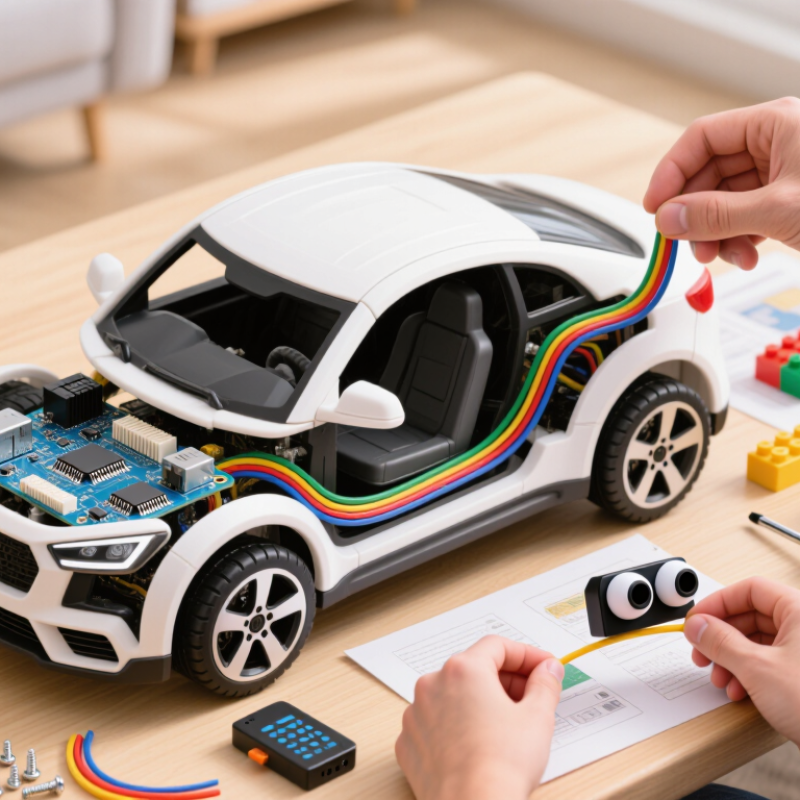
A smart toy car kit is a small vehicle that combines electronics, sensors, motors, and programmable control. Unlike a simple remote-control car, it can make decisions by reading its surroundings. Most kits include a microcontroller, motor drivers, wheels, a battery holder, and sensors for distance or line detection. The microcontroller acts as the car’s brain. Sensors report nearby objects or surface changes. The program then processes those signals and controls the motors. This creates movement, turning, stopping, or obstacle avoidance.
Programming usually begins with visual blocks or simple text commands. A beginner may choose an instruction such as “move forward,” then add a condition. For example, if the distance sensor detects an object, the car can stop and turn. Motor speed also matters. Excessive power may cause sharp turns and unstable movement. During my first test, the car turned too widely and missed the line. That mistake revealed a practical issue: code alone cannot fix poor wheel alignment or loose wiring. Reliable results require both software testing and careful assembly.
Tips: Start with a fully charged battery. Test one sensor at a time. Use a ruler to check wheel alignment. Change only one program value during each test. Write down what happened. Keep wires away from moving wheels. A clear wiring layout makes faults easier to find. Leave room for imperfect results.
A smart toy car kit combines motors, sensors, a controller board, and programmable logic to turn code into movement.
The chart presents a practical beginner learning path using typical practice-time targets. Start with motor control, then learn how to read sensors and use conditional logic. Once these foundations are understood, beginners can build obstacle-avoidance and line-following behaviors by combining sensor inputs with motor outputs.
2026 Best Smart Toy Car Kits: How to Program for Beginners
When comparing smart toy car kits in 2026, examine the programming path first. Block-based coding helps beginners control movement without confusing syntax. A clear drag-and-drop interface matters. It should show speed, direction, and sensor responses immediately. Some kits also support text-based coding later, which prevents the project from becoming too limited.
Hardware quality deserves equal attention. Look for sturdy wheels, protected motors, and connectors that fit securely. Distance sensors should detect a chair leg from several centimeters away. Light sensors are useful for simple line-following experiments. Check battery capacity, charging time, and motor noise during testing. A kit that runs for only fifteen minutes can quickly frustrate a child. Safety matters too. Rounded edges and low-voltage components are essential.
Documentation reveals the kit’s real value. Good instructions explain wiring with pictures and include small practice challenges. Experienced users should verify technical specifications rather than trust promotional claims. In one home test, a loose wheel caused repeated turning errors. Reconnecting the motor solved part of the problem, but the instructions did not explain it clearly. That weakness is worth noting. Wireless control can be exciting, yet pairing may fail near crowded networks. Offline programming is a practical advantage. Spare parts, adjustable difficulty, and responsive support can make learning feel steady instead of stressful.
Choosing the right programming platform matters more than choosing the fastest smart toy car.
Beginners need clear feedback, simple controls, and room to grow.
A block-based platform is often the gentlest starting point.
Children can connect movement commands like puzzle pieces and watch the car respond within seconds. Look for drag-and-drop controls, readable instructions, and a reset button. A beginner should test forward, reverse, turning, and stopping on a small floor area. Short experiments build confidence.
Text-based programming becomes useful when learners understand conditions, loops, and variables.
Choose a platform that supports a common beginner language and explains errors in plain English. Reliable documentation should show wiring diagrams, sample programs, and sensor tests. Check whether the software works offline, supports the car’s controller, and receives regular updates. Compatibility failures waste patience.
Test the platform before buying.
A useful trial takes fifteen minutes. Can a learner change speed, read a distance sensor, and fix one mistake without adult rescue? If every task requires copying long code, the platform may be too advanced. If it hides all logic, progress may stop later. I have found that easy platforms can feel limiting after a few projects. That is not always bad; it reveals when a learner needs a new challenge. Parents should also check data settings, electrical safety guidance, and age recommendations from reliable technical sources.
2026 Best Smart Toy Car Kits: How to Program for Beginners
Step-by-Step Guide to Building and Programming a Smart Toy Car
Choose a beginner kit with clear wiring labels, a sturdy chassis, and block-based coding support. Check that the package includes motors, wheels, sensors, a controller board, and safe low-voltage power. During my first build, I tightened the wheels too much. The car moved slowly, and I blamed the code. It was a mechanical problem. Leave each wheel spinning freely before testing the electronics.
Attach the motors to the motor ports, then connect the power wires carefully. Keep the positive and negative terminals aligned. Upload a simple program that makes the car move forward for two seconds. Test it on a clear floor. Add a stop command next. After that, program a distance sensor to reverse when an object is nearby. Change only one command at a time. This makes errors easier to find. Beginners often add too many features too soon. I still make that mistake sometimes.
Tips: Use short wires and secure loose cables with small ties. Test the sensor at different distances. Write down each change. Remove the battery before rewiring. If the car turns unevenly, inspect wheel alignment before editing the program. A quiet motor may indicate a loose connection, not faulty software. Keep hands away from moving wheels during testing.
Testing a smart toy car should begin with simple evidence, not guesses. Charge the battery, lift the wheels, and run the smallest movement program. Check whether each motor turns correctly. Then test forward, reverse, left, and right separately. My first test was not elegant. I changed three commands at once and lost the real cause. A slower method works better. Record the command, result, and possible fault in a small notebook. The World Economic Forum’s Future of Jobs Report 2023 identifies analytical thinking as a core workplace skill for 73.2% of surveyed employers. A car project makes that skill visible.
Tips: Use one variable at a time. If the car turns late, inspect timing before rewriting everything. Swap the motor connections only after checking the code. A weak battery can imitate a software error. Loose wires can create random stops. Take a short video during testing; movement often reveals problems that logs miss.
When the basic route works, expand carefully. Add a distance sensor, speed control, or a simple obstacle routine. Test the new part alone before combining it with driving commands. Keep wires separated and label both motor sides. Follow the kit’s electrical limits and use low-voltage power only. The 2024 International Federation of Robotics World Robotics report shows continuing growth in educational and service robotics, but classroom projects still fail for ordinary reasons: poor connections, unclear assumptions, and rushed testing. I still overlook those basics sometimes. That is useful feedback, not failure. A working car should be explainable, repeatable, and easy to repair.
How to test, troubleshoot, and expand your first programmable car project
| Project Stage | Recommended Beginner Setup | Typical Technical Data | Programming Goal | Test Method | Common Problem | Next Expansion |
|---|---|---|---|---|---|---|
| 1. Choose the Kit | Two-wheel-drive or four-wheel-drive car chassis with a programmable controller | 2 geared DC motors, wheels, battery holder, motor driver, jumper wires | Identify power, motor, sensor, and control connections before assembly | Check the wiring diagram and confirm that positive and negative terminals are correctly matched | Missing common ground between the controller and sensor modules | Add a mounting plate or protective enclosure after the basic car operates |
| 2. Understand Power | Use the battery type specified by the controller and motor-driver documentation | Many beginner systems use low-voltage DC supplies; motor current can be higher during startup than during steady motion | Separate motor power from logic power when the design requires it, while keeping signal grounds connected | Measure battery voltage with a multimeter before connecting the motors | The car resets when motors start because of voltage drop or insufficient current | Install an on/off switch, power indicator, or rechargeable battery monitor |
| 3. First Program | Block-based programming or beginner-friendly text programming | Use digital output commands for direction and pulse-width modulation for speed control | Make the car move forward, stop, reverse, and turn for fixed time intervals | Lift the wheels off the ground for the first motor test, then test on a clear floor | One motor spins backward because its polarity or direction setting is reversed | Create reusable functions such as forward(), stopCar(), and turnRight() |
| 4. Calibrate Motion | Use the same wheel size and a level testing surface | Wheel diameter affects travel distance; motor speed may differ between left and right sides | Make the car travel in a straight line and turn by a repeatable angle | Mark a straight path and compare the left and right wheel behavior over several trials | The car veers because of unequal motor speed, wheel friction, or loose mounting | Add software speed correction or a closed-loop encoder system |
| 5. Add Distance Sensing | One front-facing distance sensor mounted securely above the floor | Ultrasonic sensors calculate distance from echo time; readings can be affected by angle, soft surfaces, and nearby objects | Stop or turn when an obstacle is within a chosen safety distance | Test with flat objects at several known distances and record false readings | The sensor gives unstable values because of vibration, poor alignment, or unsupported measurement timing | Use multiple sensors for wider coverage or add a scanning servo mount |
| 6. Line Following | Two or more reflective optical sensors positioned close to the floor | Dark and light surfaces reflect different amounts of infrared light; sensor height and track contrast matter | Adjust motor speeds according to the detected line position | Calibrate the sensor threshold over both the track and surrounding surface | The car loses the line at corners because the speed is too high or the sensor spacing is unsuitable | Implement proportional control using the difference between left and right sensor readings |
| 7. Wireless Control | Short-range wireless module or controller-supported radio connection | Wireless range depends on obstacles, antenna position, interference, and transmit power | Send simple commands such as forward, reverse, left, right, and stop | Test command response at increasing distances while keeping a manual stop method available | The car continues moving after connection loss because the program lacks a timeout | Add a failsafe that stops the motors when no valid command is received for a set period |
| 8. Troubleshoot Safely | Disconnect power before changing wiring or moving components | A multimeter can check continuity, voltage, and accidental short circuits | Use one controlled change at a time so the cause of a fault remains clear | Test in this order: power, wiring, motor output, sensor input, then program logic | Several changes are made at once, making the original fault difficult to isolate | Keep a wiring diagram, test log, and versioned copy of working code |
| 9. Improve the Code | Organize the program into setup, input reading, decision-making, and motor-control sections | Use non-blocking timing when the car must read sensors while moving | Make the car respond consistently instead of relying only on long delays | Record response time, stopping distance, and behavior across repeated trials | Long delay commands prevent timely sensor readings and emergency stops | Add a state machine for modes such as manual, obstacle avoidance, and line following |
| 10. Document Results | Maintain a short project record with diagrams, code versions, and test conditions | Useful measurements include battery voltage, speed setting, sensor distance, and stopping time | Make the project repeatable and easier to repair or expand | Repeat each test at least three times and note environmental changes | Results cannot be compared because surface, battery level, or program settings changed | Publish a build guide, add data logging, or create a classroom demonstration |
A block-based platform is usually the gentlest starting point. Learners connect movement commands like puzzle pieces. The car responds quickly. Look for drag-and-drop controls, clear instructions, and a reset button.
Test forward movement, reverse movement, turning, and stopping on a small clear floor. Keep each experiment short. Change one command at a time. Short trials build confidence.
Text-based programming becomes useful after learners understand conditions, loops, and variables. Choose a platform supporting a common beginner language. Error messages should use plain English. Progress may feel slower at first.
Try a fifteen-minute activity. Can the learner change speed, read a distance sensor, and fix one mistake? If adult rescue is always needed, the platform may be too advanced. Test before buying.
Choose a sturdy chassis with clear wiring labels. The package should include motors, wheels, sensors, a controller board, and safe low-voltage power. Missing parts can interrupt a simple project.
Connect the motors and power wires carefully. Check that positive and negative terminals align. Upload a program moving forward for two seconds. Add a stop command. Test on a clear floor.
Mechanical problems can imitate programming errors. Check whether the wheels spin freely and align correctly. Tight wheels may slow the car. A quiet motor may indicate a loose connection. I sometimes blame code too quickly.
Remove the battery before rewiring. Keep hands away from moving wheels. Secure loose cables with small ties. Test sensors at different distances. Write down every change. I still add too many features sometimes.
A smart toy car kit combines a small programmable controller, motors, sensors, wheels, and a power system to create a vehicle that can detect its surroundings and respond to code. When comparing the best 2026 smart toy car kits, beginners should consider assembly difficulty, sensor variety, programming options, safety, documentation, expandability, and value. The ideal platform should offer both visual programming and an accessible text-based language, allowing learners to progress at a comfortable pace.
This guide explains how to program a smart toy car for beginners through a practical step-by-step process: identify the parts, assemble the chassis, connect the motors and sensors, install the programming software, and upload a simple movement routine. Beginners can then test forward, reverse, turning, obstacle detection, and speed control. Troubleshooting advice helps resolve wiring, power, sensor, and code problems, while future projects can add line tracking, automatic navigation, remote control, or improved sensor logic.

Hoopla Toys